Showing posts with label TIPS N TRICKS. Show all posts

Uji kekuatan PASSWORD anda ^________^

on 31 December 2011


ADAKAH PASSWORD ANDA BETUL2 SELAMAT ???

Ramai dari pakar sekuriti online mencadangkan password yang baik ialah:

1- Selalu ditukar-tukar. Tapi awas jangan sampai terlupa pula.
2. Menggunakan password kata yang panjang.
3. Menggunakan gabungan huruf capital dan small letter.
4. Menggunakan karakter gabungan alfa-numberik dan simbol-simbol.

Bagaimana kita boleh membuat password yang benar-benar selamat.
Ada satu alat pengukur password online yang bagus yang dapat menunjukkan seberapa kuat password anda


* Masukkan password yang ingin diuji dalam Password Meter
* Periksa semua saranan untuk menyukarkan dan memantapkan password anda.
* Meter akan menunjukkan jika password menggunakan simbol, angka tengah, huruf kecil, huruf besar bersama dengan panjang password.
* Jika percentage password belum 100% ubah password dengan beberapa tambahan untuk membuatnya kuat iaitu sebesar 100%.

Password meter ini sebagai alat ini dapat digunakan untuk memudahkan penggunaan untuk mengingati password menjadi lebih kompleks. Kebanyakan dari orang membuat password berdasarkan dari data diri sendiri atau hal-hal yang disukai.

Password begini dapat mudah diteka oleh orang lain tetapi jika password berisi dengan berbagai jenis karakteristik seperti huruf besar, huruf kecil serta simbol atau menambahkan nombor yang mudah diingati maka kombinasi tersebut cukup untuk password tidak mudah diteka.
Sebenarnya selain web passwordmeter.com ini, banyak lagi website dan perisian yang anda boleh gunakan untuk menguji kekuatan password anda. Anda boleh googling sendiri.


Tag :

Remove VIRUS SHORTCUT guna NOTEPAD jep !

VIRUS SHORTCUT nie da berleluasa kat DUNIA nie..terutamanya yg dop U, POLI, IPG ke. n pusat2 pengajian yg de kat MALAYSIA nie

nak tahu pe i2 virus shortcut ?? KLIK SINI, panjang sangat ulasannyer..hahaha

nie la rupa virus shorcut yea : 
gambr nie ak bedal lam google.. maaf ye TT.hehehe :P
CAMNE NAK RWAT PENYAKIT NIE ?

1 . bukak NOTEPAD 2

2. then buka SCRIPT

3. copy semua  yg ad lam SCRIPT 2, copy semua tau, jgn tertinggal 1 pon.

4. paste kat NOTEPAD anda.

5. save as NOTEPAD 2, killervirus sar .bat
* pastikan dibelakang name 2 ad : .bat

6. da save 2, try run nie di tempat ad VIRUS SHORTCUT 2,
*lau ad lam pendrive, copy file tdi, paste kat pendrive, run it

tengop gambar nie lau masih x faham.


lau MALAS SANGAT nak COPY PASTE , anda ley DOWNLOAD at CNIE :
KLIK SINI WEH !


p/s : sebelum cucuk pendrive kat leptop membe / cc / mkmal computer 2, hati2 la sikit yea. lau nak cara selamat transfer barang, u all just sent to jep ..insyaALLAH selamat.. sekian
Tag :

Compress File 1GB to 10MB

on 27 December 2011

Ini adalah satu software yang sangat power untuk digunakan bagi mengecilkan saiz fail yang sedia ada dengan kadar yang cukup tinggi. Selalunya kita kalau nak kecilkan saiz fail menggunakan winzip, saiz fail tu hanya akan kecil sebanyak berapa persen sahaja, tapi dengan software ni, saiz fail anda akan kecil dari 1GB ke 10MB


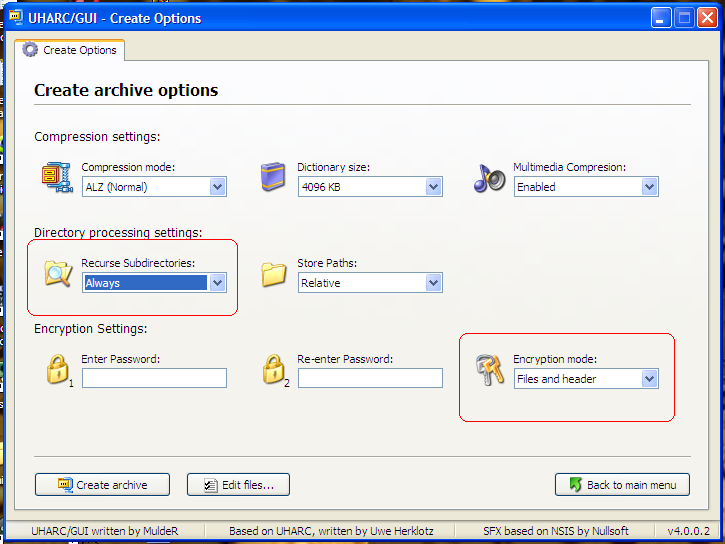
Step1 : Klik Create New Archive...


Before compress and add data setting this first, choose Option


Step 2 : Drag file dari luar masuk dlm software ni atau add file atau add folder...

Step 3 : Selepas masukkn file click create archive


Step 4 : Save file name..(nama yg berbeza dengan folder asal)


Last : Tunggu sehingga complete.


TUTORIOL VIDEO


FullCredit 2 : Gempak.orng@Leon S Kennedy
Tag :

How to Root Your HTC Vivid

on 18 December 2011


The HTC Vivid features a massive 4.5-inch SLCD screen and dual-core processing–something that owners of the device can be much proud of. If you’re one such owner, you’ll be glad to know that you can finally get your hands dirty with rooting your HTC Vivid, as the guys from XDA Developers have managed to get through the phone’s internal system.

In this article, you will learn how to root your HTC Vivid. The method has been tested to work on both the AT&T variant as well as the Canadian variant. According to the developer, the rooting method uses the zergRush exploit and will supposedly grant permanent root access, rather than temporary root access, if the device’s bootloader is also unlocked.

What is Rooting?

Rooting your HTC Vivid simply means you’ll be getting something similar to Administrator-level privileges on a Windows-based machine. Rooting is to Android what jailbreaking is to the iPhone. Having root access opens up opportunities for you to enjoy new unique features and functionalities that you couldn’t normally enjoy on a non-rooted device. For instance, you can set up your phone to function faster than normal, install third-party apps that require root access, and use custom ROMs.
Keep in mind that having root access also voids your manufacturer’s warranty. Although, there is always the option of unrooting your device by means of flashing back to the stock ROM or you could use SuperOneClick.

Prerequisites
  • Before starting, fully charge your phone, or at least have 60% battery power when performing the rooting procedure. Having enough power on the phone will ensure an uninterrupted process. Interruptions to the process could brick your phone and render it useless.
  • Enable USB debugging on your phone. You can do this by heading to Settings > Applications > Development > USB Debugging.
  • Save all of your phone’s data by making a back-up copy of your call log, text messages, media files, Internet settings, and other important data so that you have a fallback if anything should happen to your phone after undergoing the rooting procedure.

Once you’ve got the prerequisites covered, you can now proceed to the rooting procedure.
Rooting Instructions


  • Download the USB driver files for your HTC Vivid. Get them from here and install the drivers to your computer so that your computer can correctly recognize your device.
  • Download the rooting files for the HTC Vivid. You can get the files here. Extract the ZIP file’s contents into a folder on your computer.
  • Connect your phone to your computer using a USB cable. When the device asks you for a connection type, specify “Charge only.” Your computer ought to be able to recognize your device.
  • Go to the folder where you extracted the rooting files. Double-click on the RUNME.bat file to start the rooting process.
  • You will be presented with prompts and instructions along the way. Just follow them from start to finish.
  • Reboot your phone.
Tag : ,

PC Auto Shutdown 5.0

on 14 December 2011

PC Auto Shutdown 5.0
PC Auto Shutdown is a handy software that helps you automatically shutdown, power off, reboot, hibernate, suspend or log off computers at schedule time you specifies. It can shut down computers at schedule time when no user is logged in or when computers are in suspended power conservation mode. It gives you different ways to schedule the shutdown event for your needs, such as daily, weekly and only once. During the shutdown, it can clean up Recycle Bin, temporary files, IE cache, IE cookies, IE history, IE auto- complete entries and recent document list to improve system performance and protect your privacy.


Tag : ,

TIP MENIRU KETIKA PEPERIKSAAN

on 14 November 2011


Cellphone sebagai penghubung.

Dunia semakin maju seiring dengan gajet-gajetnya. Cellphone juga merupakan gajet yang semakin berkembang pesat kemajuannya. Namun begitu, kemajuan tersebut seharusnya dimanipulasikan dengan baik oleh pelajar-pelajar yang pemikirannya berorentasikan inovasi. Ada dua cara nak gunakan cellphone sebagai medium meniru ketika peperiksaan akhir ini.

Pertama : Tulis nota dalam save item SMS. Ataupun ambik gambar nota-nota terus save dalam handphone. Cara nak baca nota ini ketika perperiksaan ialah ketika pengawas peperiksaan sedang leka berbual hal AF di belakang. Para peniru perlu berani mati ketika ini. Ketika tangkap. mati.

Kedua : Suruh kawan yang tak ambik paper masa tu, standby kat rumah dengan buku teks. Bila si penjawab dah stuck, segera lah ke tandas, hantar mesej kepada member yang kat rumah. Member tersebut dapat je, terus cari jawapan dalam buku teks tadi. Semua operasi ini harus dilakukan bawah 5 minit untuk mengelakkan para pengawas peperiksaan curiga dan was-was.

Nota dibalik slip peperiksaan

Slip periksa perlu dibawa sebagai bukti si pengambil kertas ini meengambil kertas yang betul. Untuk mangadaptasi teknik ini, memerlukan keberanian tahap dewa ketujuh. Hal ini kerana slip periksa itu cuma sehelai. Macamana nak selitkan nota dibelakangnya. Ada tekniknya. Jangan ingat MLM sahaja ada teknik jadi kaya. Caranya, serta-merta masuk ketika pelajar lain berpusu-pusu ingin masuk ke dewan. Biasanya akan ada pak guard menjaga pintu dewan. Tapi kalau dah ramai-ramai masuk, mana sempat dia nak tengok sorang-sorang.

Dah masuk terus ambik tempat duduk. Biasanya kertas soalan dan kertas jawapan dah tersedia atas meja. Sejurus sahaja duduk, terus selitkan nota tadi dibalik kertas-kertas soalan tadi. Tadaaaa… Sudah ada jawapan di kertas soalan anda. Natijahnya? Menjawab soalan dengan senyuman. Kehkehkeh…

Nota di tandas

Untuk mengaplikasikan kaedah ini, para peniru perlu meletakkan nota lebih awal dari waktu peperiksaan yang dijadualkan. Datang awal ke dewan, pergi ke tandas dan letakkan nota di balik tangki tandas jamban tu. Kemudian keluar semula ke tempat orang berkumpul dengan perasaan yang tak berdosa dan muka innocent macam tak de apa-apa berlaku.

Masa peperiksaan berlangsung hampir satu jam dan anda sudah ketandusan jawapan, pergilah toilet di mana nota yang telah anda selitkan. Proses membaca nota ini harus dilakukan bawah 5 minit. Merbahaya kalau kentoi. Kehkehkeh…

Tulis nota di tapak tangan

Ini merupakan salah satu teknik yang paling mengarut tapi masih ada yang aplikasikannya. Bayangkanlah, tapak tangan kita tu besar mana untuk di tulis nota. Tapi ada jugak yang gunakan teknik ni.
Cubalah perhatikan sekeliling anda sewaktu menunggu detik untuk masuk ke dewan peperiksaan. Mesti ada tangan yang penuh dengan tattoo. Tapi bukan tatu naga atau harimau, tatu tersebut berunsurkan tulisan.


SUMBER : KAKILEPAK
Tag : ,

Majalah PC #177 (September 2011)

on 12 October 2011


Majalah PC merupakan sebuah majalah berbahasa Melayu yang diterbitkan di Malaysia. Ia diterbitkan secara bulanan. Ia merupakan majalah khusus dalam bidang komputer dan diterbitkan secara bulanan. “Sumber komputer, internet dan multimedia” merupakan motto bagi majalah ini.

Majalah ini berharga RM4.80 di Semenanjung Malaysia dan RM5.80 di Sabah/Sarawak. Ia diterbitkan oleh Kumpulan Karangkraf Sdn Bhd.

Ia merupakan majalah berbahasa Melayu tentang komputer paling laris jualannya di Malaysia.

Date: September 2011
File type: PDF, 26.0MB
Pages: 82


CREDIT TO : 

Tag :

5 Services To Convert Websites For Mobile Devices

on 05 October 2011

The rise of the mobile is undeniable. Many even say that the future of the web lies on mobile devices. Gone were the days when people can only access the internet at home or in their office, but now some of them even throw away the heavy PC and adopted the mobile devices for web surfing experience.

mobile website conversion services 5 Services to Convert Websites For Mobile Devices

Sensing the importance stated above, it will be really wise for you to consider a mobile version of your website. Well, going mobile entails another hefty development process, but the good news is there are cheap but quality solutions, and what’s better: right here is a list of services that you can use to either convert your website into mobile version, or create it from scratch.

Details after the jump!


mobiSiteGalore claims itself to be the easiest mobile web builder, for as average as 54 minutes their customers can already build a fully functional mobile version of their website. Another good thing is, as you may have noticed, many of the services listed below focuses on smartphones. Well, mobiSiteGalore do support low end phones that aren’t so smart. (Free – $225/year)
mobisitegalore 5 Services to Convert Websites For Mobile Devices


With mofuse, there are two ways to convert your site to mobile: building it yourself through mofuse or hiring them to build it for you. By building it yourself using their application, you have more control over the design and development process, only you’ll have to pay a monthly subscription to keep the service going, else you can hire their design experts to build it for you. (Self Service: $7.95/month – $199/month)

mofuse 5 Services to Convert Websites For Mobile Devices


Turns your website into mobile version really fast with bMobilized. It offers the fast conversion with comprehensive customization as an option available for you to tune the design well.

bMobilized claims they support more than 13000 mobile devices, including all major brands. Also the more website you host using their service the higher the discount you get. So if you have a network of websites that needs conversion, bMobilized is the perfect service for you! ($19.99/month)
bmobilized 5 Services to Convert Websites For Mobile Devices


ConvertWebsite requires their customer to send them the PSD file of the website they wish to convert. Why? To determine what approach is best in the redesigning process from desktop to mobile. Its method is quite similar to Code My Concept, which means handcrafting your provided PSD into mobile website.

Unlike other services, this service actually takes days for the conversion. For a general conversion the delivery date is 9 days, with option to expedite the process. The price is fairly high compared to other service, but consider that your site is handcrafted by industry professional. ($307 – $362)

convertwebsite 5 Services to Convert Websites For Mobile Devices

5. Mobify

If you are engaged in e-commerce, Mobify is probably the best service out there for you. Mobify offers HTML5 features for its clients, and their experienced teams will design your mobile site to your specific requirements, with the fact that most stores going from concept to launch within 3 weeks. You can also go for self-serve solution by referring to their Publisher page. (Publisher Pricing: $0 – $1000)

mobify 5 Services to Convert Websites For Mobile Devices

6. Onbile

In a hurry to create a mobile version of your website? Well, with only 3 very simple steps and 5 minutes at hand you can! Onbile supports smartphones like iPhone, Android, and Blackberry. The only disadvantage here will be its limited templates, but their templates are generally awesome! (Free)

onbile 5 Services to Convert Websites For Mobile Devices


Mobile App America promises better SEO for your website, and most of all it helps to gain a competitive advantage among your competitors who doesn’t have an elaborated mobile version of their websites yet. As of writing this, it supports devices including iPhone, Blackberry, and Android. (Free)

mobile app america 5 Services to Convert Websites For Mobile Devices


MobStac delivers the future-ready, HTML5-enabled experience for your mobile website. It also got easy customization, and supports several themes (if you want a change of design) and CMS integration.

Among other services, MobStac is probably one of the few that has an in-depth monetization plan for mobile websites. The only disadvantage is the service is currently in Beta, but you can sign up for an invite. (Free – $19/month)

mobstac 5 Services to Convert Websites For Mobile Devices

END 

Think if you will really need a mobile version of your website. Mobile conversion has its ups and downs. The pros are indeed easier navigation, optimized user experience, and focused site content.

Its disadvantage, however, is there will be limited advertisement space. Really. Also, if your website exists with heavy and tantalizing graphics and you want it the same in mobile version, you might need to think to redesign the current site or abandon the conversion as the mobile website should be designed with minimalism in mind.

So consider carefully between the pros and cons, and make the wise decision that will benefit your users and you.


Tag :

Komputer gagal akses Facebook selepas terkena virus Facebook Chat

on 17 August 2011


Ramai orang kata Facebook mereka gagal diakses selepas terkena virus Facebook Chat yang tersebar meluas. Mungkin masalah ini boleh diatasi dengan membuat beberapa perkara berikut:

1. Masuk Facebook menggunakan address www.www.facebook.com

2. Scan komputer anda menggunakan antivirus seperti MSE dan Malwarebytes. Boleh dapatkan di article ini Senarai perisian penting komputer

3. Jika berjaya masuk Facebook, sila login dan tukar password facebook serta gunakan https.

4. Check hosts file pada komputer anda. Taip “notepad C:WindowsSystem32driversetchosts” pada start menu atau command run untuk membuka.


5. Berikut adalah rupa hosts file default pada Windows. Kalau hosts file anda ada tulisan, nombor, ip, nama yang aneh dan pelik sila restore balik kepada default. Hosts file digunakan untuk membenarkan dan menghalang website daripada dilayari di sesebuah komputer.

6. Gunakan dns comodo yang lebih secure. 156.154.70.22, 156.154.71.22

6. Kami akan tulis beberapa tips keselamatan akaun Facebook di masa akan datang. Selamat mencuba :)


Tag :

FB auto LIKE ... -LIKE-LIKE-LIKE :)

on 29 July 2011

haii all, hari ni lan nak ajar 1 trik FB yng psti kowang nk tau...
lau nak diikutkan EAJUK ENTRY nei, lan nak ajar cara buat FB LIKE semua STATUS yg ada di wall kita atau ni wall friend kita, bukan stakat di wall kita dan friend,
wall PAGE or EVENT pown boleh..

ok... caranya senang saja... lan ajar step by step k..

1. buka  LINK nie dlu, dalam nie ad javascript tau :


bila anda CLICK 2, akan KUAR text javascript

2. Copy semua javascript tu,

3. pegi la mana2 wall yg anda suka, termasuklah wall anda sendiri.he9

4. paste javascript yg anda copy tdi ke address bar. contohnya :


5. dah paste tu, akan kuar 1 kotak :


6. tekan button OK ..

7. dengan automatik semua yg ad kat PAGES 2 akan LIKE dengan sendirinya, nie buktinya :

8. senang kan ?? :).. selamat mencuba..


P/S : penuhkan NOTIFICATION kawan anda :P


semuanya terserah kepada anda.. jika xnak cuba..abaikan entry nie...


JANGAN GUNA BNYK SNGAT... KANG X PASAL2 KOWANG KENA BLOCK NGAN FB..


comment la sikit.. 
lau xnak comment tekan LIKE pon OK jugak :P
Tag :

Kembalikan CHAT facebook ANDA kepada ASAL

on 24 July 2011

Bagaimana Nak Kembalikan Facebook Chat Yang Asal /lama ?
mesti anda tertanya2 kan... lan telah buat kajian pasal FB CHAT yg baru nie, 
RAMAI YANG XSUKA FACEBOOK CHAT yg baru ini ??? bagaimana anda??haha9

ok.. caranya senang je.. anda cuma perlu INSTALL plug-in saja...

UNTUK PENGGUNA GOOGLE CHROME :

anda perlu install ini je :


Script installFacebook chat script installed


UNTUK PENGGUNA MOZILLA FIREFOX

 korang kena install  Greasemonkey or Scriptish dulu sebelum install PLUGIN yang lan bagi tadi

Add to FirefoxInstalling Geasemonkey

+++++++++++
KALAU MALAS NAK ISNTALL PLUGIN 2
anda boleh guna popout chat nie, t dye akan keluar semua rakan2 anda yg tgh on9. 


comment la sikit.. 
lau xnak comment tekan LIKE pon OK jugak :P


S.U.M.B.E.R
Tag :

Paypal bypass @ Cracking

on 06 July 2011


This is a Simple bit of javascript that can bypass payments, the site's need to be sites like these:

or

How to use it:

Copy the code (Below)
Go to the page that you'r doing it on
Paste the link you copied into the URL and it should start.

(If you can find anymore please let me no.)

Code:

javascript:top.location=document.getElementsByName('return')[0].value; javascript:void(0);


Hope this really help's you and you save a bit off $$$$$$


Tag :

Angry Birds theme for Windows 7

on 02 July 2011

Microsoft has released a new official Angry Birds theme for Windows 7 users. This theme features popular character’s from Angry Birds game series including wallpapers and cool sound effects.
angry birds official theme windows 7 thumb Download Angry Birds official theme for Windows 7
Download Angry Birds theme

You can visit the theme’s page here or direct download from this link : 

Angry Birds Custopack

Angry Birds custopack is an unofficial theme suite done by Deviantart members. It features cool wallpaper, angry birds start orb button, angry birds logon screen and dock icon.

angry birds custopack thumb Download Angry Birds official theme for Windows 7
angry birds custopack4 thumb Download Angry Birds official theme for Windows 7
angry birds logon screen windows 7 thumb Download Angry Birds official theme for Windows 7
angry birds theme windows 7 thumb Download Angry Birds official theme for Windows 7
angry birds theme windows 74 thumb Download Angry Birds official theme for Windows 7


Download ANGRY BIRDS CUSTOPACK Windows 7. 
You need to have CUSTOPACK installed to use this theme suite.


Tag :

Search Dengan Mudah Menggunakan FILESONIC :)

on 21 June 2011

nampak x gambar di atas?? hehehe9.. 

k ari nie lan nak share camne nak cari MOVIE ke, SOFTWARE ke, APE2 JELA ke..ha9..
kowang just taip APA YANG HENDAK KOWANG cari lam kotak yg telah disediakan 2.
dah taip, tekan jea search. t akan kuar bnyk search result, kowang pilih la yg mane suka yea...
TAPI!, xsemua link hidup..he9... lau link hidup, Naseb baek la. lau link Mampus, cuba cari link lain yea..

2 saje.. tq  

nie link dia :


p/s : pastikan anda Taip Nama penuh Apa yag kowang nak cari untuk memudahkan pencarian 
Tag :
 
© Tips | Download | Free Tools | Games | | All Rights Reserved
D.I.Y Themes ByBelajar SEO